Robots are now critical to manufacturing—not just in automotive, but in aerospace, electronics, logistics, consumer goods, machining, medical devices, and more. Yet one of the largest challenges with robotic automation remains the same: programming new paths without stopping production. Every minute of downtime impacts throughput, scheduling, labor costs, and ultimately profitability.
Offline Robot Programming (OLP) solves this challenge by allowing engineers to create, test, optimize, and validate robot programs in a virtual environment before the robot ever stops or moves. Instead of writing code directly on the shop floor, OLP makes it possible to develop fully tested robot jobs entirely in software—using digital twins, real robot kinematics, CAD models, and simulation—to deliver high-quality programs with minimal physical touch-up.
This guide breaks down what OLP is, how it works in practice, why it’s becoming a foundational technology for advanced manufacturing, and how it compares to traditional online programming.

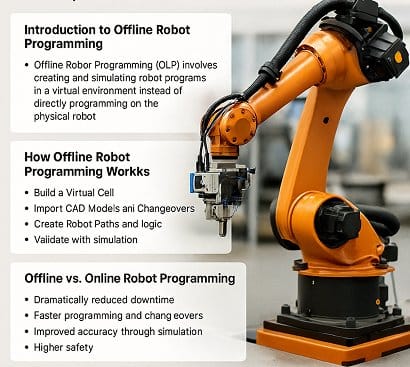
Introduction to Offline Robot Programming
Offline Robot Programming (OLP) is the process of generating robot paths, logic, and operations in a virtual programming environment rather than on a teach pendant or physical robot. OLP software uses:
- A full kinematic model of the robot
- CAD models of parts and fixtures
- Accurate representations of tools, grippers, weld guns, sensors, and machining heads
- Digital twins of workcells and production systems
Through this approach, engineers can create robot programs in a digital environment that mirrors the real world.
OLP is built on three core capabilities:
1. Digital Twin Fidelity
The 3D model must match real-world geometry:
- Robot
- Tooling
- Part orientation
- Workholding
- Safety structures
- Conveyor motion
- Sensors and external devices
A strong digital twin dramatically reduces real-world adjustments.
2. Real Robot Kinematics
The OLP platform includes manufacturer-accurate kinematic models for:
- FANUC
- ABB
- KUKA
- Yaskawa
- UR
- Staubli
- Kawasaki
- Epson
- Many others
This ensures robot motion in simulation matches true joint limits, elbow configurations, singularities, and approach paths.
3. Controller-Level Code Generation
Instead of exporting generic code, OLP systems output native robot language:
- FANUC TP/LS
- ABB RAPID
- KUKA KRL
- Yaskawa INFORM
- URScript
This makes the program immediately usable in production.
OLP is not just about convenience—it’s about keeping production running while engineering evolves in parallel.
How Offline Robot Programming Works
A full OLP workflow includes several highly precise steps that align digital simulation with production reality:
1. Building the Virtual Cell
The first step is creating a 3D workcell that mirrors the physical world. This includes importing CAD files for:
- Fixtures
- Tables
- Weld tooling
- Grippers
- Machining heads
- Sensors or scanners
- Safety fences
- Infeed/outfeed systems
This becomes the engineer’s digital workspace.
For manufacturers running high-mix, low-volume operations, these models often change, which makes OLP indispensable.
2. Configuring Robots, Tools, and Coordinate Frames
Robot accuracy in OLP depends heavily on correct reference frames:
- Robot base frame
- Tool Center Point (TCP)
- Workpiece coordinate systems
- Fixture frames
- User frames / object frames
Establishing these correctly in OLP ensures that when code is deployed to the real robot, alignment matches reality with minimal touch-up.
3. Importing CAD Parts and Process Data
The engineer imports CAD representations of the part being welded, trimmed, inspected, or assembled.
This is where OLP shines:
CAD paths translate directly into robotic motion.
Examples:
- Weld seams follow edge curves from the CAD model
- Trimming paths follow the part’s surface geometry
- Inspection paths follow defined point clouds or measurement features
This creates consistency and eliminates errors introduced by manual teaching.
4. Creating Robot Paths
Using the OLP environment, the engineer defines:
- Approach angles
- Tool orientation
- Joint configurations
- Motion blending
- Speed and acceleration profiles
- Process-specific parameters (weld heat, inspection dwell time, cutter RPM, etc.)
Every motion is validated in simulation before the real robot moves.
5. Collision and Reachability Analysis
One of the biggest advantages of OLP is the ability to test feasibility before robots run on the floor.
Simulation checks for:
- Stationary collisions
- Dynamic collisions
- Robot-robot interference
- Wrist flips
- Singularities
- Axis limits
- Payload limits
- Tool obstruction points
Instead of discovering problems during production changeovers, OLP catches them instantly.
6. Cycle-Time Estimation and Optimization
The OLP system calculates predicted cycle-time for every simulation run. Engineers can:
- Optimize path lengths
- Use arc motion instead of point motion
- Reduce unnecessary orientation changes
- Minimize external axis repositioning
OLP makes time studies far easier compared to on-floor testing.
7. Exporting Controller-Specific Code
Finally, the program is exported in the robot’s native code. Advanced OLP platforms ensure:
- Joint motion matches simulation
- Frame relationships are preserved
- I/O, logic, and triggers are included
- External axis parameters are handled correctly
After this, the program is uploaded to the real robot controller.
8. Minimal On-Robot Verification
Modern OLP + calibration systems can reduce online touch-up to nearly zero.
However, depending on the application, a small amount of real-world validation is still performed:
- Fine TCP adjustments
- Frame alignment checks
- Process tuning (weld heat, cutter depth, sensor timing)
For many operations, this final step takes minutes—not hours.
Benefits of Offline Robot Programming
Here are the major advantages that set OLP apart and justify its investment:
1. Reduced Downtime (The #1 Driver)
Because programming is done offline, robots remain in production.
For large manufacturing plants, avoiding downtime can save thousands of dollars per hour
2. Faster Program Development
OLP turns programming from a manual, linear activity into a parallel activity.
Engineering can prepare programs while:
- The line is running
- Fixtures are being built
- New SKUs are being installed
This reduces launch timelines dramatically.
3. Faster Changeovers for High-Mix Operations
When you must run multiple products through the same robot cell, OLP is essential.
Examples:
- New trim paths for new mold designs
- New weld seams for variant parts
- New inspection trajectories for different assemblies
- Different pallet or pack patterns
These changes don’t interrupt production.
4. Lower Safety Risk
With OLP, engineers do dangerous testing virtually, not in front of a live robot.
The simulation catches many potential issues:
- Crashes
- Overtravel
- Tool interference
- Safety zone violations
This significantly improves workplace safety.
5. Better Cell Optimization and Flexibility
Because OLP exposes the entire virtual cell, engineering can test:
- Multiple workcell layouts
- Different robot models
- Alternative tooling
- Multi-robot synchronization
- Human-robot collaborative workflows
This leads to faster and smarter manufacturing decisions.
6. Higher Accuracy When Paired With Calibration
OLP works best when real robots are calibrated.
Without calibration, even a perfectly simulated program may require adjustments.
When combined with calibration systems (such as Dynalog’s), customers can achieve:
- Lower touch-up time
- Better absolute positioning
- Faster deployment
- Higher quality
- Better cross-fixture consistency
This synergy is where OLP truly delivers its full value.
Offline vs. Online Robot Programming
This comparison will help manufacturers decide where OLP fits in their workflow.
Online Programming (Teach Pendant)
Pros:
- Immediate feedback
- No special software needed
- Good for simple, repetitive tasks
Cons:
- Requires taking robot offline
- Slow, point-by-point teaching
- Higher labor requirements
- Increased crash risk
- Poor for high-mix production
Offline Programming (OLP)
Pros:
- Robots stay in production
- Full simulation reduces errors
- Supports complex motion and multi-robot systems
- Ideal for high-mix operations
- Enables digital twin workflows
- More accurate when paired with calibration
Cons:
- Requires accurate digital twin
- Requires investment in OLP software
- Initial setup time to model the cell
When to Use Which
| Scenario |
Best Method |
| Simple pick and place |
Online |
| High-precision machining |
OLP |
| Weld process with many tool angles |
OLP |
| Cell with frequent product changes |
OLP |
| One-time project |
Online |
| Fully automated inspection |
OLP |
Conclusion
Offline Robot Programming is rapidly becoming a standard requirement for modern automation. It empowers manufacturers to build, test, and refine robot programs using digital twins—without ever interrupting production. The result is faster launch times, reduced downtime, safer engineering, higher flexibility, and—when combined with robot calibration—exceptionally accurate and reliable robot performance.
As more companies transition to high-mix manufacturing and adopt digital transformation strategies, OLP becomes a critical piece of the automation ecosystem.